


Table of Contents
Most Shopify SEO advice treats collection pages as one line item on a longer checklist: write a unique description, pick a primary keyword, move on. That's fine as far as it goes. It also misses the part that tends to move traffic fastest once a catalogue has any real size to it, which is how you structure the collections themselves.
If you've already worked through the technical basics, Google Search Console, canonical tags, meta titles, VAT-inclusive schema pricing, our Shopify SEO checklist covers that ground in full. This piece goes deeper on one specific thing: why a single generic collection page usually undersells your catalogue, and how to fix that without creating the duplicate-content mess that a lazy version of this strategy produces.
Why one generic collection page leaves volume on the table
Say you sell running shoes. The instinct is to build one collection: "Running Shoes." Clean URL, one page, done. The problem is that "running shoes" isn't really one search intent. It's several, wearing the same two words.
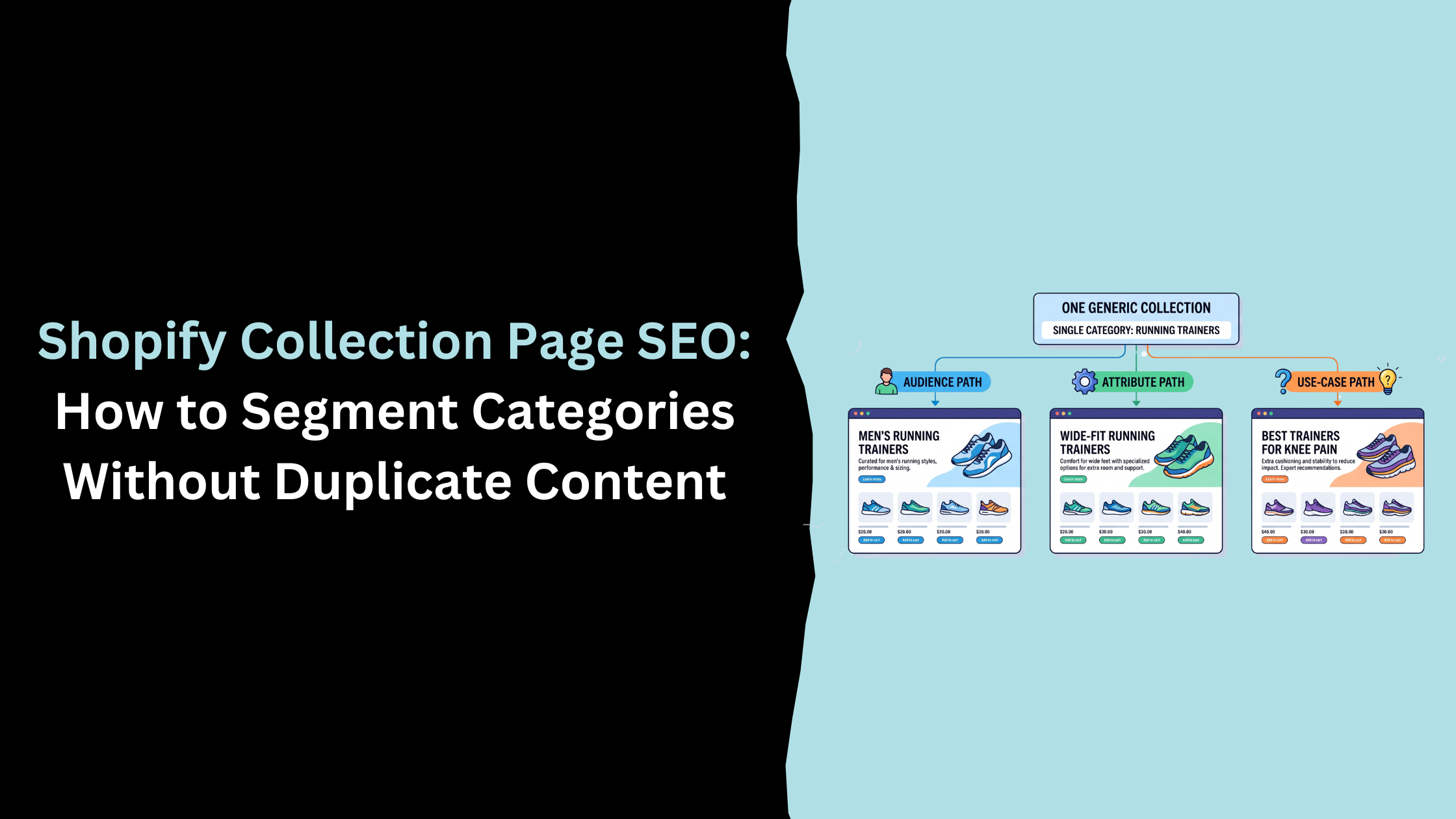
Someone searching "running shoes for men" wants a different page experience than someone searching "wide fit running shoes," who wants something different again from someone searching "best running shoes for bad knees." Each of those is a real, searched phrase with its own volume, and each implies a different H1, a different intro paragraph, and arguably a different set of products surfaced first. A single generic collection page can rank for one of those intents reasonably well. It's structurally weaker at ranking for all of them at once, because the page can only be written to answer one question clearly.
The volume behind this is worth seeing in one place:
That's not a niche long tail. "Running shoes for men" and "running shoes for women" are each pulling more monthly search volume than most single generic category terms manage on their own. Treating them as an afterthought inside one page, rather than as collections in their own right, is a genuine gap in most Shopify stores' architecture.
Three ways to segment a collection
Once you've picked a category worth splitting, there are three practical axes to segment along, and most product ranges support at least two of them.
The most obvious axis is audience: men's, women's, kids'. It's usually the highest-volume split and the easiest one to justify building first.
Product attribute is the second axis: wide fit, waterproof, plus size, extra cushioned. These map to a physical characteristic a shopper is already filtering for, and the commercial intent tends to be strong, since the shopper knows roughly what they want and just needs the right fit.
Use-case or problem is the third and softest axis: running shoes for knee pain, gifts for new parents, jackets for festival weather. It sits closer to informational intent than the other two, but it's also the one competitors skip most often, which is exactly why it pays to build it when the search volume backs it up.
You don't need to build all three for every category on day one. Start with whichever axis has the clearest search demand for your specific catalogue, and expand from there.
If you want to go a step further and actually define who your audience segments are before you build collections around them, rather than guessing, that's really a market segmentation exercise, and we've covered the customer-research side of that separately in our guide to eCommerce market segmentation.
Segmenting without creating duplicate content
Here's the part that gets glossed over, and it's worth taking seriously, because done badly this strategy backfires. I've seen stores get the ambition right and the execution wrong, three or four genuinely useful new collections built on top of a faceted navigation system nobody had cleaned up first, so the new pages launched straight into a swamp of thin filter URLs competing with them.
There's a real difference between a deliberately built segment and an auto-generated filter permutation. If your Shopify theme's faceted navigation lets a shopper filter "running shoes" by colour, size, and brand, and each combination spits out its own crawlable, indexable URL, you don't have three useful collections, you have a mess of thin, near-identical pages competing with each other for the same handful of products. That's the exact trap some SEO commentary warns about when it says segmented collections risk turning into duplicate content. They're not wrong. They're describing a different, badly built version of the same idea.
The difference is intent and effort. A collection built for "running shoes for men" earns its place because it has a genuine reason to exist independent of the parent category: its own primary keyword, its own short intro paragraph written for that specific shopper, and, ideally, products curated or reordered for that audience rather than an identical grid. A filtered URL generated by clicking "colour: red" on the same page has none of that. It's the same content with a query string attached, and it's exactly the kind of low-value page our crawl budget guide covers in more depth.
In practice: build and internally link the collections with genuine independent search demand, and give each one real copy. For the sort and filter combinations underneath them that don't carry their own demand, either noindex them or make sure canonical tags point back to the parent collection, so Google isn't left guessing which version matters. It's the same underlying discipline we cover for product variants in the hidden cost of duplicate product pages, just applied one level up, at the collection rather than the product.
Both things can be true at once: segmentation is a legitimate strategy, and unmanaged faceted navigation is a genuine risk. The fix isn't to avoid segmenting. It's to be deliberate about which pages earn an index entry.
Worked example
Take that running shoes category and turn it into a small architecture.
The parent collection, Running Shoes, holds the broadest catch-all copy and links down into everything below it. Running Shoes for Men and Running Shoes for Women each get a short intro written specifically for that shopper and their own title tag, rather than sharing the parent's generic wording. Wide Fit Running Shoes pulls from products already tagged with that attribute and speaks directly to fit concerns instead of repeating the parent collection's pitch. And Best Running Shoes for Knee Pain sits closer to a buying guide than a pure category page: a handful of curated products, and ideally a link out to a blog post that goes deeper on cushioning and impact if you've got one.
Every one of those is a genuine landing page with its own reason to rank. None of them are duplicates of each other, because none of them answer the same question.
I'd rather see a store build three or four collections like this properly, each with real copy and a clear reason to exist, than ten thin ones chasing every filter combination a theme happens to support. The second approach looks more thorough on a spreadsheet. It performs worse in Google.
Where this fits into your wider Shopify SEO work
Collection architecture is one part of a bigger picture. If you haven't already, it's worth working through the technical foundations first (canonical tags, indexation, GA4 consent mode, structured data), since a well-segmented collection set still needs a technically sound store underneath it to actually rank.
Once the technical basics and the collection structure are both in decent shape, a Shopify SEO audit is a sensible way to find out where your specific store stands before committing to a full restructure. It's also broadly the shape of work our Shopify SEO services cover, from the technical side through to exactly this kind of collection strategy.
Frequently Asked Questions
How many Shopify collections should I have?
As many as you have genuine search demand for, and no more. Build a collection when a specific audience, attribute, or use-case has real search volume behind it and deserves its own copy. Don't build one just because a filter combination happens to be technically possible.
Will splitting a collection into several hurt my SEO through duplicate content?
Only if the new collections share the same copy, the same H1 pattern, and no independent search demand. A deliberately built segment, with its own keyword, intro, and reason to exist, isn't a duplicate. An auto-generated filter URL with none of that is. The strategy itself isn't the risk, unmanaged faceted navigation is.
Should segmented collections appear in my main navigation?
The high-volume ones, yes, audience segments especially, since they usually carry enough search demand to justify a nav slot. Lower-volume use-case collections often work better linked from relevant blog content or product pages instead, so navigation doesn't get overloaded with pages most shoppers won't click.
Do I need separate collections for filters like colour or size?
Generally no. Colour and size are usually better handled through Shopify's native filtering, with those combination URLs kept out of the index via canonical tags. Reserve dedicated collections for segments with real, independently searched demand, audience, broader attributes like fit, or genuine use-case, rather than every filter combination your theme can generate.
Related Post


Get in touch today
complete the form below for an informal chat about your business

We are a small, but perfectly formed, Digital Marketing Agency based in Stoke-on-Trent, Staffordshire. We provide services that help business owners make more money online.

