


Table of Contents
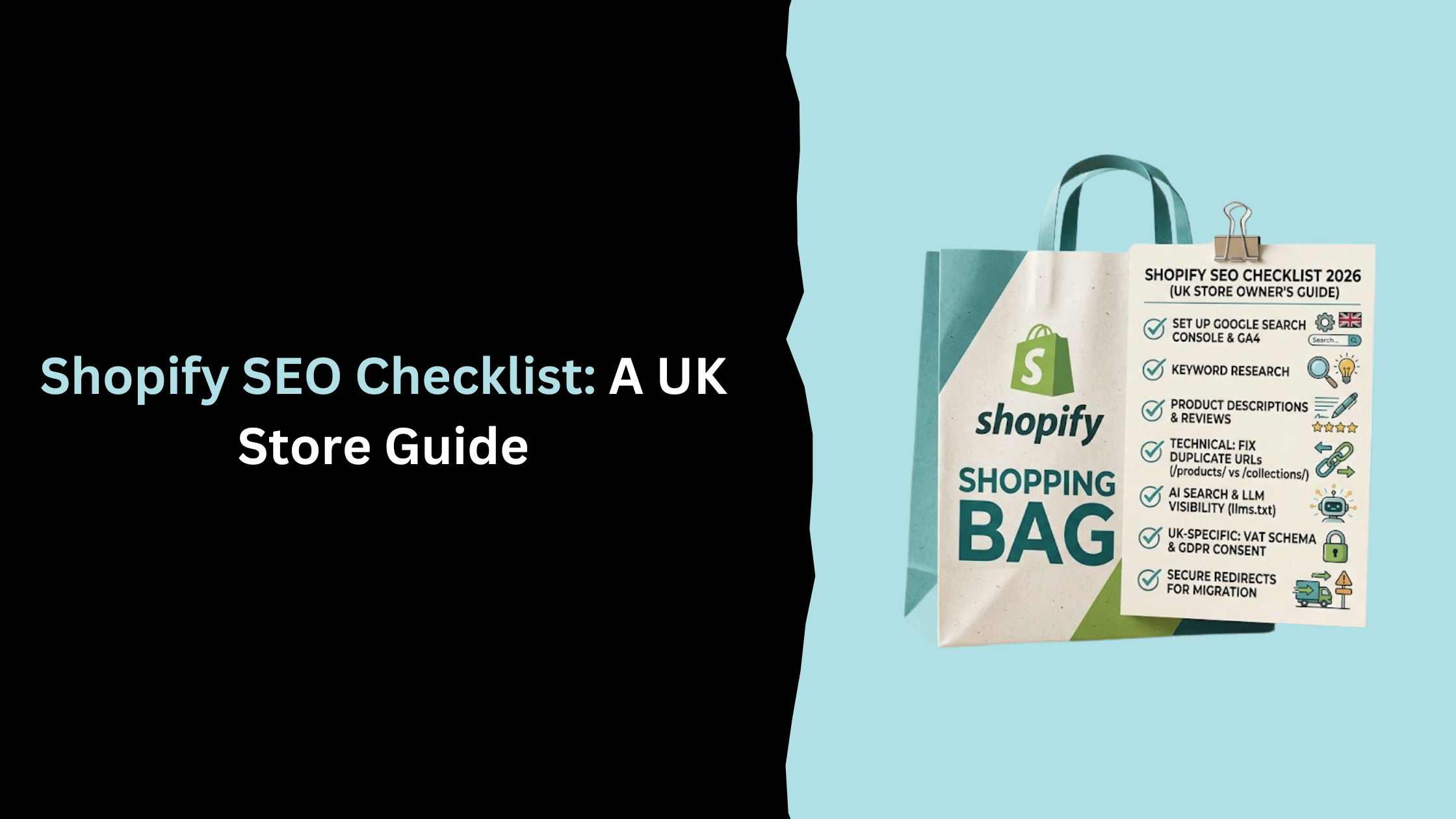
Search "Shopify SEO checklist" and you'll get roughly the same list every time: set up Google Search Console, write unique meta titles, compress your images, build some backlinks. All true. None of it explains why your UK competitor's product pages keep beating yours.
This checklist covers that baseline too, because skipping it would be irresponsible. But it spends most of its length on the things that actually separate a ranking Shopify store from one stuck on page two: a URL duplication problem Shopify's own documentation barely touches, what AI search means for a store selling physical products, and the UK-specific details that most Shopify SEO advice, written with a US audience in mind, quietly skips over.
SEO basics checklist
These are one-time setup tasks. If you've been running your Shopify store for more than a few months, skim this section and jump to the technical checklist below, where the real gains are.
Set up Google Search Console and Google Analytics
Google Search Console is how you'll know whether Google can actually see your store. Verify your custom domain, submit your sitemap, and check back weekly for coverage errors and manual actions. It's free, it takes fifteen minutes, and I still meet store owners who've never opened it.
Google Analytics matters for a different reason: Shopify's built-in analytics tell you what sold, GA4 tells you how people found you in the first place. Connect GA4 through Shopify's Online Store settings and set up at least basic ecommerce event tracking (product views, add to cart, purchase) so your keyword research actually connects to revenue later.
Submit your sitemap and confirm indexing
Every Shopify store gets an automatically generated sitemap.xml, listing your products, collection pages, and blog posts. Submit it in Search Console under Sitemaps. Then search "site:yourdomain.com" to spot-check what's actually indexed. If your newest products aren't showing up after a week or two, something's blocking them, usually a stray noindex tag left over from a theme customisation.
Do keyword research before you write anything
Basic, but worth stating: don't write a product description or a collection page and hope it ranks for something. Use Google Keyword Planner, or a proper keyword research tool if you have one, to find what people actually type before they buy. Map one primary term to each page. Product pages should target transactional searches, collection pages should target category-level searches, and blog posts should carry the informational ones. Mixing these up is the single most common reason a Shopify SEO strategy stalls before it starts.
On-page SEO checklist
Meta titles and descriptions
Shopify lets you edit these from the product, collection, or page admin under "Search engine listing." Keep titles under 60 characters and descriptions under 155, and write them for a human deciding whether to click, not for a search engine. A meta description that just restates the title wastes space that could be persuading someone in the search results.
URL slugs and heading structure
Shopify defaults to using your product or page title as the URL slug, which is usually fine but occasionally produces something long and awkward. Clean it up: lowercase, hyphens instead of underscores, no filler words. If you change a slug on a page that's already indexed, tick the box to create a redirect, or you'll hand Google a 404 and lose whatever rankings that URL had built up.
Every page needs exactly one H1. On product pages this is almost always the product name. Everything below it should follow a sensible H2, then H3 order rather than skipping around because a smaller heading looked better visually.
Product pages, descriptions and reviews
Your product pages are where most of your Shopify SEO effort should go, because they're the pages actually trying to convert. Manufacturer descriptions are duplicate content the moment a second retailer copies and pastes them, so write your own, ideally 150 to 300 words that answer the questions a buyer would actually ask: sizing, materials, what makes this different from the similar product two clicks away.
Product reviews help here in two ways. They add fresh, unique content to the page on autopilot, and if you've got review schema in place, they can pull star ratings into the search result itself. If you're feeding your catalogue to Google Shopping through Google Merchant Center, keep your on-site product titles and your feed titles consistent, mismatches between the two are a common source of disapproved listings.
Image alt text and compression
Shopify doesn't compress images for you. Large, unoptimised product photos are one of the most common reasons a Shopify store fails Core Web Vitals. Compress before upload, name the file something descriptive rather than a camera-generated string of numbers, and write alt text that actually describes what's in the photo. Do this for accessibility first; the SEO benefit is a side effect, not the point.
Shopify-specific technical SEO checklist
This is where most generic checklists, including Shopify's own, run out of detail. Shopify handles a lot of technical SEO automatically. The parts it doesn't handle are exactly the parts worth getting right, because almost nobody else does.
Fix the /products/ vs /collections/ duplicate URL problem
Here's the one that catches nearly everyone. Add a product to a collection, and Shopify makes it reachable at two different URLs:
- yourstore.com/products/product-handle
- yourstore.com/collections/collection-handle/products/product-handle
Most Shopify themes add a canonical tag on the collection-nested version, pointing back to the plain /products/ URL, which handles indexation in the sense that Google generally knows which one to show. But canonical tags are a hint, not a rule, and I've audited stores where a theme update, a review app, or a badly configured collection filter quietly broke that canonical, leaving both versions live in Google's index and splitting whatever link signals the page had earned.
The fix isn't glamorous. Check a sample of your product pages in an incognito browser, view source, and confirm the canonical tag actually points to the flat /products/ URL. On a small catalogue you can do this by hand in an afternoon. On anything larger, run a crawl with Screaming Frog, export every URL matching /collections//products/, and check the canonical field for each one rather than sampling and hoping the rest follow the same pattern, because theme inconsistencies rarely do.
Then audit your internal links, navigation menus, related-product blocks, blog posts, and make sure they all point to that same flat URL rather than a collection-nested variant. Consistency here does more for you than the canonical tag alone, since every internal link pointing at the wrong URL variant is a small vote of confidence going to the version you don't actually want indexed.
Handle variant URL parameters correctly
If your products have variants (size, colour, material), Shopify can generate URLs like yourstore.com/products/product-handle?variant=123456789 for each combination. These aren't separate pages content-wise, but they can get crawled and occasionally indexed as if they were, which is wasted crawl budget on a large catalogue. Keep your canonical tags pointing to the base product URL without the variant parameter, and avoid linking directly to variant-specific URLs from anywhere outside the product page itself.
What you can (and can't) edit in robots.txt: 2026 update
You'll still find Shopify SEO advice claiming robots.txt is locked and uneditable. That was true once, but Shopify added a robots.txt.liquid template in 2021, meaning every merchant can now customise their robots.txt directly from Shopify admin under Online Store > Themes > Edit code. If a checklist tells you otherwise, it hasn't been updated since 2021, which tells you something about how carefully the rest of it was maintained.
Most stores don't need to touch the default, which already blocks low-value paths like cart and checkout from crawling. Where it does matter is the next section.
Cart and checkout page indexability
Your cart and checkout pages generate unique, session-based URLs by design, and Shopify blocks them from indexing by default. Leave that alone. There's no SEO upside to a checkout page ranking, and trying to "optimise" it usually means fighting Shopify's own architecture for no benefit.
AI search and LLM visibility checklist
This is the newest and least settled part of Shopify SEO, and I'll say upfront that some of it is still speculative. Nobody, including Google, has fully explained how AI Overviews select sources, and the practices below are best current judgment rather than proven ranking factors.
What is llms.txt and does your Shopify store need one?
llms.txt is a proposed convention, a plain text file at yourstore.com/llms.txt that summarises your site's structure specifically for AI systems to read. It's not an official standard, no major AI crawler is confirmed to require it, and adoption is genuinely mixed. I wouldn't treat it as urgent. I would treat the underlying idea, having clearly structured, easily summarised content, as worth doing regardless of whether the file itself ever catches on.
Structuring product and FAQ content for AI Overview citations
What does seem to matter, based on how AI Overviews currently behave, is having facts stated plainly near the top of a page rather than buried in marketing copy. Pair questions with direct answers where it's natural, in an FAQ block or within the product description itself. A sentence like "this jacket is machine washable at 30 degrees" sitting on its own line is easier for an AI system to lift and cite than the same fact wrapped in three sentences of brand voice.
Auditing your robots.txt for AI crawler access
Worth checking, and often overlooked: whether your robots.txt is accidentally blocking AI crawlers like GPTBot, ClaudeBot, or PerplexityBot. Some Shopify SEO apps add blanket bot-blocking rules aimed at scrapers and end up catching these too. If you want your store surfaced in AI search results, check your robots.txt doesn't quietly disallow them. If you'd rather your product content wasn't used to train models, blocking them is a legitimate choice too, just make it deliberately rather than by accident.
UK-specific Shopify SEO checklist
Most Shopify SEO content is written for a US store owner and applies to the UK with a few word swaps. It shouldn't be. A few things genuinely differ.
VAT-inclusive pricing in product schema
UK consumer pricing law requires the price shown to consumers to include VAT. Your structured data price should match what's actually displayed on the page, VAT-inclusive, not a pre-VAT figure copied from a supplier feed. Mismatches between your displayed price and your schema price aren't just an SEO issue, they can flag you for a manual review under Google's shopping ads policies too.
GDPR-compliant analytics and cookie consent setup
If you're running GA4 with any kind of remarketing or Google Ads integration, you need Google Consent Mode configured alongside your cookie banner, not just a banner that disappears when someone clicks accept. Get this wrong and you'll either under-collect data (harming your ability to measure what's working) or over-collect it (a genuine compliance risk under UK GDPR). This sits at the intersection of legal and technical SEO, worth getting a second opinion on if you're not confident.
UK-relevant directories and local signals
A lot of Shopify SEO checklists recommend listing your store on the Better Business Bureau, Yelp, and Angi. None of those carry weight for a UK audience. If local SEO is relevant to your store, meaning you have a physical presence or serve a specific region, prioritise Google Business Profile (still commonly called Google My Business by most people, including, frankly, me half the time), Yell.com, and Trustpilot, which carries far more trust weight with UK shoppers than it does elsewhere.
Shopify Markets and hreflang if you sell beyond the UK
If you're expanding from the UK into the EU or US, Shopify Markets handles most of the hreflang implementation automatically once you set up market-specific domains or subfolders, telling Google which version of a page to show which audience. What it won't do for you is translate and localise the content itself; a page that's just machine-translated tends to underperform a properly localised one, even with perfect hreflang in place.
Migrating to Shopify? Don't lose your rankings
If you're moving from WooCommerce, Magento, BigCommerce, or anywhere else, this is the single riskiest moment in your store's SEO history, and it's the part almost every checklist skips.
Building your redirect map before launch
Before you migrate, export every indexed URL from your current platform, using Search Console's coverage report as your source of truth, not just your sitemap, since sitemaps miss orphaned but still-ranking pages. Map each old URL to its new Shopify equivalent and set up 301 redirects before the new store goes live, not after. Redirecting a category page to your homepage because you couldn't be bothered mapping it properly is how stores lose a chunk of their organic traffic in the first month post-migration and spend the next six trying to claw it back.
Post-migration traffic monitoring
Watch Search Console daily for the first two weeks after launch, then weekly for two months. Check for a spike in 404s (a sign your redirect map missed something), a sudden drop in indexed pages, and movement in your search engine rankings for your top existing terms. Some short-term dip is normal as Google reprocesses the new site. A sustained drop past week three usually means something in the redirect map or the new site's technical setup needs fixing, not more patience.
Content and off-page SEO checklist
Blog and topical authority
A blog isn't required to run a Shopify store, but it's the main lever available for ranking on informational searches your product pages can't own. Build it around clusters rather than random posts: a hub page on a broad topic your customers care about, with supporting posts linking back to it and out to relevant product pages. A store selling coffee equipment might build a hub page around home brewing methods, with individual posts on grinders, pour-over technique, and water quality, each one linking back to the hub and sideways into the relevant product or collection page. One post in isolation rarely moves the needle. A cluster, built over a few months, starts pulling in search traffic the product pages alone never could. This is a slower SEO strategy than a lot of the technical fixes above, but it compounds in a way they don't.
Link building fundamentals
Backlinks still matter, and they're still the part of SEO effort that's hardest to shortcut. Guest posts, digital PR, and reclaiming unlinked brand mentions all work, but they work slowly and inconsistently. Prioritise quality over volume: one link from a genuinely relevant UK publication or blogger in your niche is worth more than fifty from link directories nobody reads.
Sending samples to relevant reviewers and bloggers still works better than most people expect, provided you're targeting people who genuinely cover your category rather than anyone with an email address and a following. Run a competitor's backlink profile through an SEO tool occasionally, not to copy it link for link, but to spot the types of sites that already link to stores like yours. If three competitors all have a link from the same regional gift guide or trade publication, that's a reasonable pitch to make yourself.
Shopify SEO checklist FAQ
What is a Shopify SEO checklist?
A Shopify SEO checklist is a structured list of optimisations, covering setup, on-page content, technical configuration, and off-page signals, aimed at improving how well a Shopify store ranks in search engines. A good one accounts for Shopify's specific platform quirks, not just generic SEO advice that happens to be applied to a Shopify store.
How do I check my Shopify store's SEO?
Start with Google Search Console for indexing and search performance, then run your store through a free tool like Google PageSpeed Insights for technical health. Beyond that, a proper Shopify SEO audit from a Shopify SEO manager or agency will catch platform-specific issues, like the duplicate URL pattern above, that generic tools tend to miss.
Which SEO tool is best for Shopify?
There isn't one universal answer. Apps like Smart SEO or an SEO manager app handle meta tags and basic schema well for stores that want to avoid touching theme code. For anything deeper, keyword research and rank tracking still tend to happen outside Shopify entirely, in a dedicated SEO tool rather than an app store add-on.
Is SEO still worth it in 2026 with AI search?
Yes, though the mechanics are shifting. AI Overviews and AI search reduce clicks on some informational queries, but transactional searches, the ones that actually drive Shopify sales, still send traffic largely as they always have. Being well-structured for AI citation is a bonus on top of solid SEO, not a replacement for it.
None of this is a weekend project, and if it feels like more than you can take on solo, that's a fair reaction; it's also exactly what Shopify SEO services exist to help with. But if you work through this checklist properly, closing the technical gaps most competitors skip rather than just ticking off the basics, you'll have something closer to the ultimate Shopify SEO checklist for a UK store than the generic versions currently sitting above you in the search results.
Related Post

Get in touch today
complete the form below for an informal chat about your business

We are a small, but perfectly formed, Digital Marketing Agency based in Stoke-on-Trent, Staffordshire. We provide services that help business owners make more money online.

