


Table of Contents
Duplicate product pages can quietly cut organic traffic by splitting ranking signals across many near-identical URLs (variants, filters, tracking parameters), so Google indexes more pages but trusts fewer of them. The fix is usually structural: pick one “primary” URL per product, consolidate signals to it, and stop your site from creating indexable copies.
Why duplicate product pages happen (even on “clean” sites)
Most online stores don’t set out to create duplicates. They grow into them.
A catalogue starts simple: one product, one URL.
Then reality shows up:
- Color variants (/tshirt?color=blue, /tshirt-blue, /tshirt/blue)
- Size variants (S/M/L), material variants, bundles
- Faceted navigation (brand, price, size, colour, style)
- Sorting (?sort=price-asc)
- Pagination (?page=2)
- Tracking (?utm_source=...)
- Search pages (/search?q=...)
- Country/language routing and currency switches
- Session IDs (less common now, still exists)
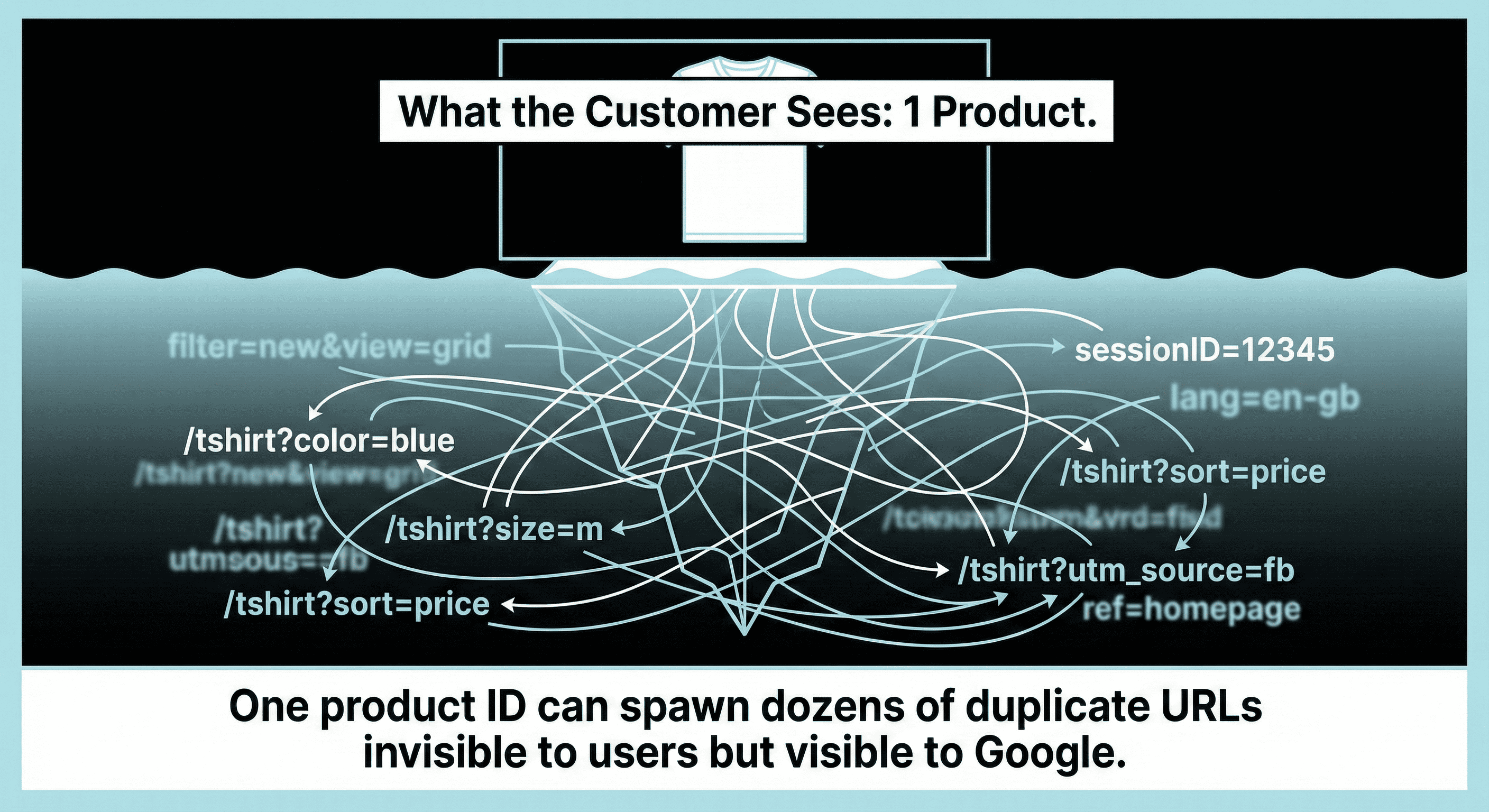
Each “quirk” seems harmless. Combined, they create a long tail of URLs with the same core product copy, the same images, and the same intent.
Google sees that as duplication or near-duplication.
What counts as a “duplicate product page” in SEO terms?
A duplicate product page is any URL that:
- Competes with another URL on your site for the same product intent, and
- Has substantially the same main content (title, description, images, specs), and
- Offers no unique search value that warrants a separate indexable URL.
That includes “near duplicates,” not only identical pages.
Common duplicate patterns
The real cost: how duplicates dilute rankings
Duplicate pages don’t just “waste crawl.” They change how signals distribute.
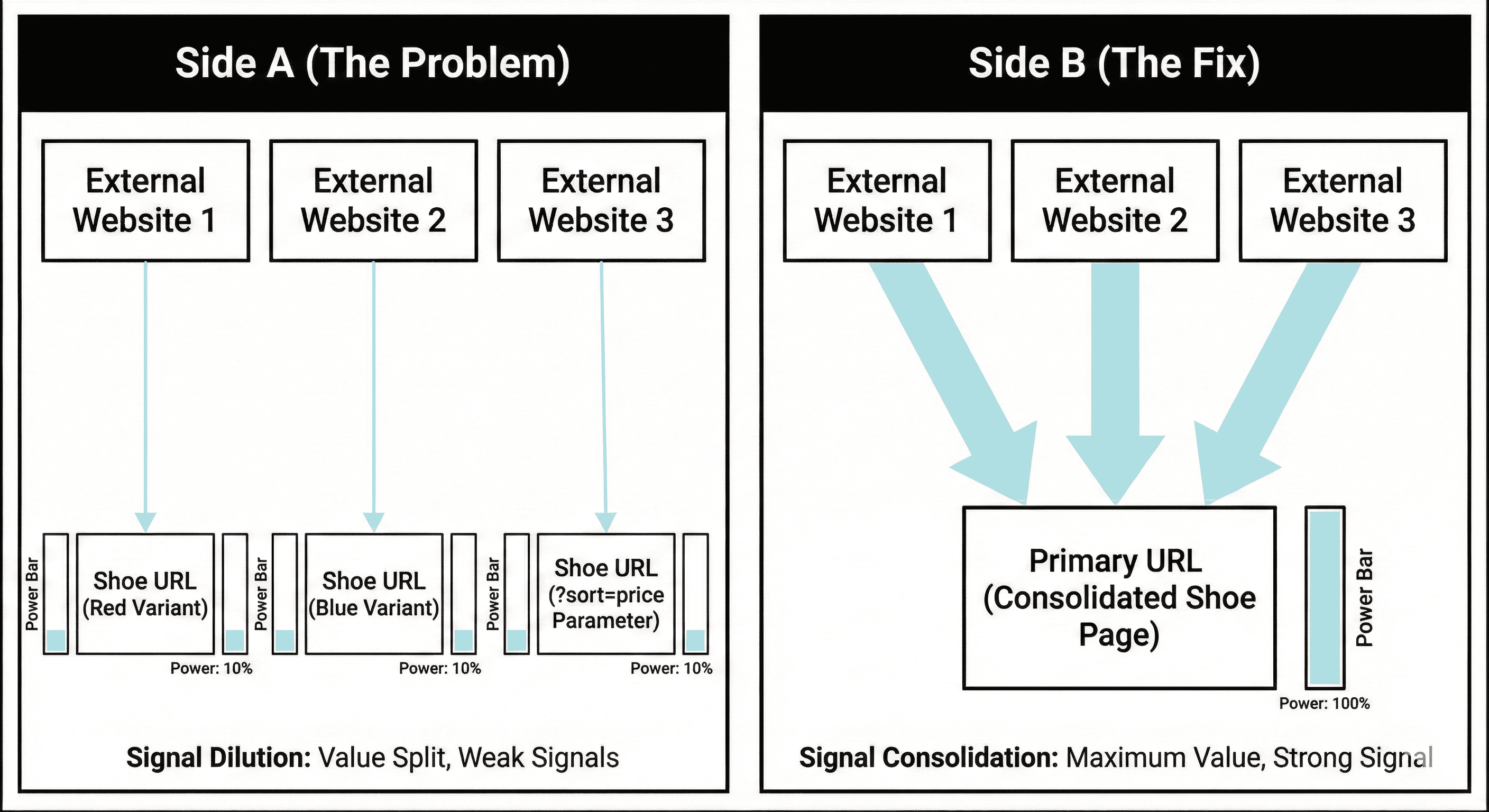
1) Link equity splits across multiple URLs
If people link to different versions of the same product (red URL, blue URL, parameter URL), you don’t get one strong page. You get multiple weak pages.
That looks like:
- Backlinks spread across 3–20 URLs for the same SKU family
- Category pages linking to mixed variants
- Internal links scattered across filters
Even if you have strong authority, dilution makes it harder for any single URL to stand out.
2) Relevance signals fragment
Google ranks pages based on matching intent. If five URLs all claim to be “the product page,” Google must decide which one is the best representative.
When the site keeps producing similar candidates, Google often:
- Indexes several
- Tests them
- Swaps the visible URL in results over time
- Ignores your preferred URL more often than you expect
That instability is a ranking tax.
3) Cannibalisation starts (even when pages “look” different)
A red variant might start ranking for the generic product query, while the parent product page ranks for the colour query, then they swap. Click-through rates wobble. Conversion tracking gets messy.
You don’t need two pages fighting for the same intent.
4) Crawl budget gets misallocated
Googlebot has finite time on each site. If it spends that time on:
- ?color=
- ?sort=
- ?ref=
- ?utm_
…it spends less time on:
- New products
- Updated products
- Category pages you actually want indexed
- Editorial content that builds demand
This matters most for medium and large catalogues, but small catalogues feel it too when duplication balloons.
5) Index bloat increases, quality signals drop
When a large share of your indexed URLs are repeats, the site’s indexed set becomes noisy.
In practical terms, that can look like:
- More “Crawled - currently not indexed”
- More “Duplicate, Google chose different canonical”
- Slower discovery of new URLs
- Lower consistency on which URL ranks
A quick diagnostic: are duplicates hurting your store?
Use this short checklist before changing anything:
Search Console signals
- In Indexing → Pages, do you see many URLs labelled:
- “Duplicate, submitted URL not selected as canonical”
- “Duplicate, Google chose different canonical”
- “Alternate page with proper canonical”
- In Performance, do you see impressions spread across many product URL variants for the same product name?
Site-level signals
- Does site:yourdomain.com "Product Name" show multiple URLs for one product?
- Do category pages generate lots of indexed filter URLs?
- Do you have multiple URL formats for one product (with and without parameters)?
Crawl-level signals (best if you can access logs)
- Is Googlebot spending time hitting parameters repeatedly?
- Are variant URLs crawled more than the parent product URL?
If you answered “yes” to any of these, there’s likely recoverable organic traffic.
Decide your “primary URL” strategy first
Before touching canonical tags or robots directives, choose how your store should represent products in search.
There are three common strategies. Pick one per product type.
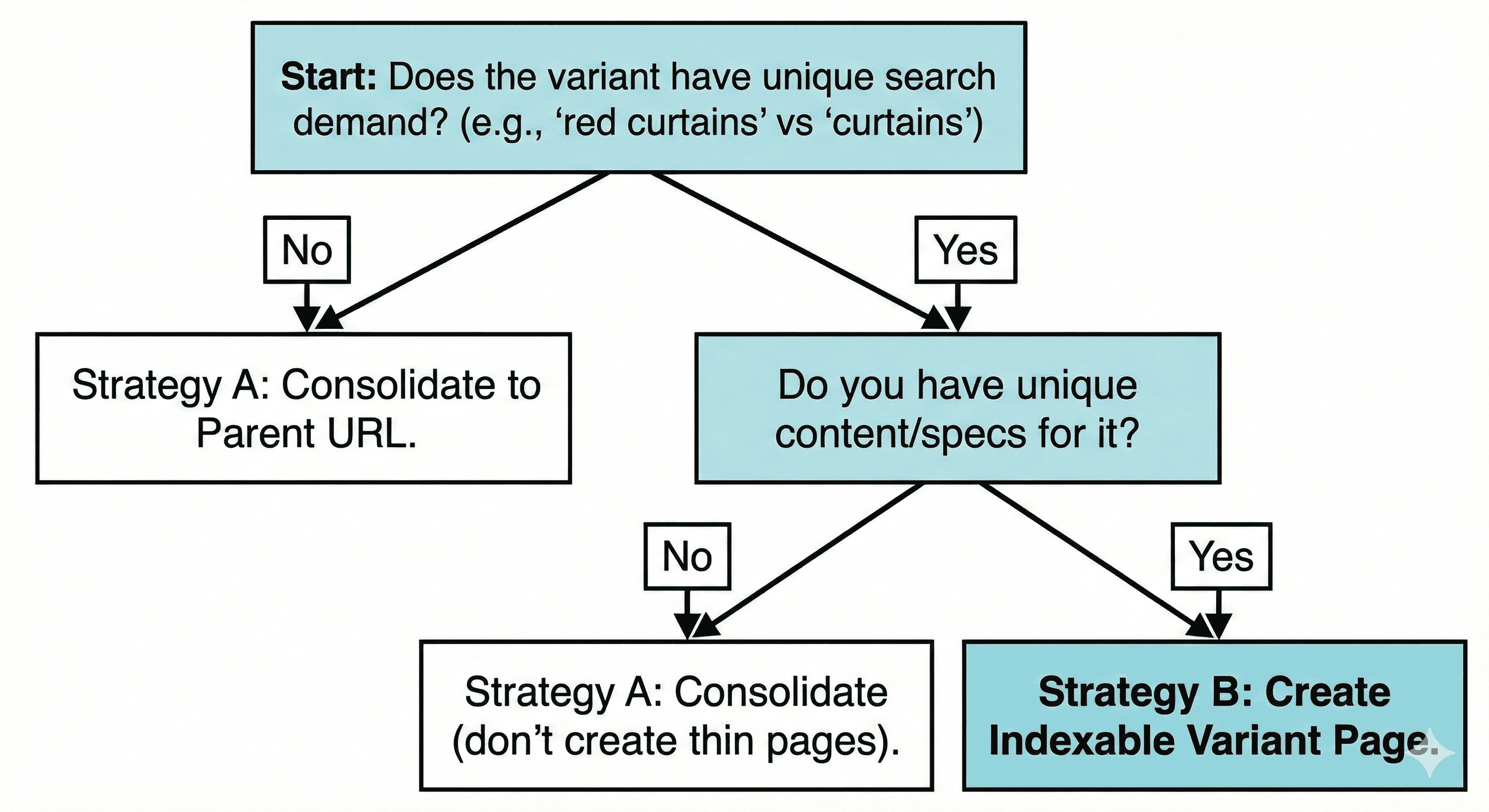
Strategy A: One indexable URL per product (parent page)
Best for: most stores, most products, variants with minimal unique demand.
- Parent URL is indexable: /product/shoe
- Variant selection happens on-page (dropdown, swatches)
- Variant URLs either don’t exist, or exist but are not indexable
Goal: concentrate ranking signals into one URL.
Strategy B: One indexable URL per variant (only when variants have distinct demand)
Best for: variants that behave like separate products in search demand.
Examples:
- “Blackout curtains 84 inch” vs “Blackout curtains 63 inch”
- “iPhone 15 Pro Max 256GB” vs “512GB” (sometimes)
- A colourway with cultural demand and distinct imagery
If you do this, each variant page must earn its place:
- Unique title targeting that variant
- Unique images (not the same gallery reordered)
- Variant-specific availability, size chart relevance, specs, shipping info, reviews segmentation if possible
If variant pages are thin, Strategy B turns into self-inflicted duplication.
Strategy C: Hybrid
Best for: large catalogues where a small set of variants deserve their own indexable landing pages, but most don’t.
- Parent is canonical
- A curated subset of variants are indexable and internally supported (not accidental parameter pages)
Hybrid works well when you treat “indexable variant” as a deliberate SEO product decision.
The fixes: recover traffic without rebuilding the site
Fix 1: Canonicalise duplicates to the primary product URL
A canonical tag is your strongest, most direct signal for consolidation.
Canonical basics that matter in real stores
Your canonical tag should be:
- Present on every product/variant URL you want consolidated
- Pointing to the chosen primary URL (usually the parent)
- Absolute (full URL) in most setups
- Self-referential on the primary URL
Example:
<link rel="canonical" href="https://www.example.com/product/shoe" />
Common canonical mistakes that keep duplicates alive
- Canonical points to a URL that returns 301/302, 404, or non-200
- Canonical chains (A canonical → B canonical → C canonical)
- Mixed signals:
- Canonical says parent, but internal links point to variants
- Sitemap lists variant URLs
- Hreflang references variants
- Canonical is missing on parameter URLs that your site outputs
When canonical is not enough
Canonical is a strong hint, not a guarantee. Google can ignore it when:
- Pages are too different (Strategy B situation)
- Internal linking contradicts it heavily
- The canonical target looks weaker than the duplicate
- Parameter URLs appear more often across the site
That’s why canonical should be paired with the next fixes.
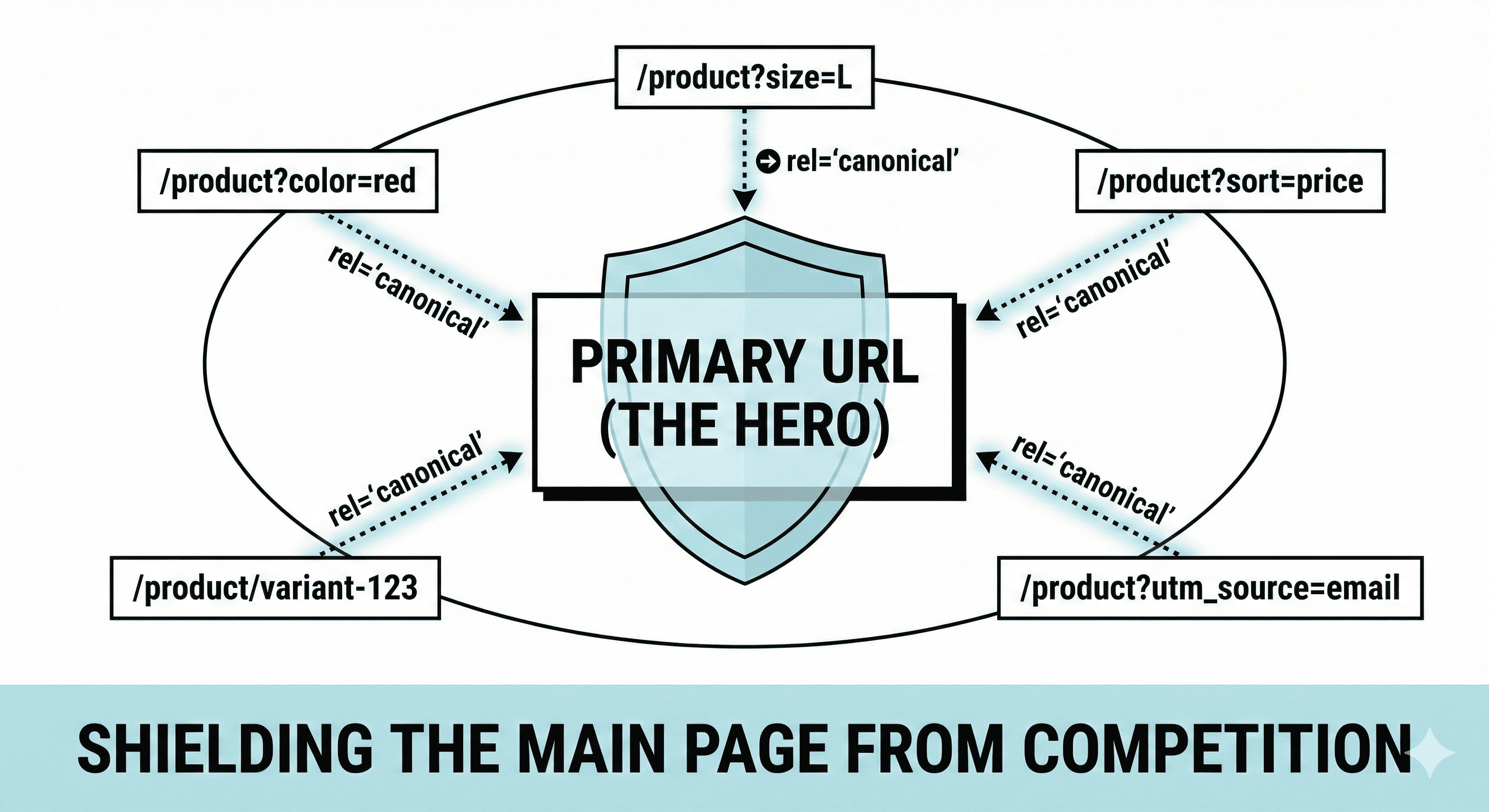
Fix 2: Stop internal links from pointing at duplicates
Internal links are a voting system.
If your category grid links to ?color=blue URLs, you’re teaching search engines that those URLs matter.
What to change
- Product listing pages should link to the primary product URL.
- Swatch links should avoid generating crawlable index candidates.
A practical approach for swatches:
- Keep selection on the same URL
- Use UI state or fragments (like #blue) for user experience
- If variant URLs must exist, block them from internal navigation as default targets
A simple rule
If a URL should not rank, don’t link to it from templates that appear site-wide.
Fix 3: Control URL parameters and faceted navigation
Facets are a major duplication engine. They can also be an SEO asset when handled intentionally.
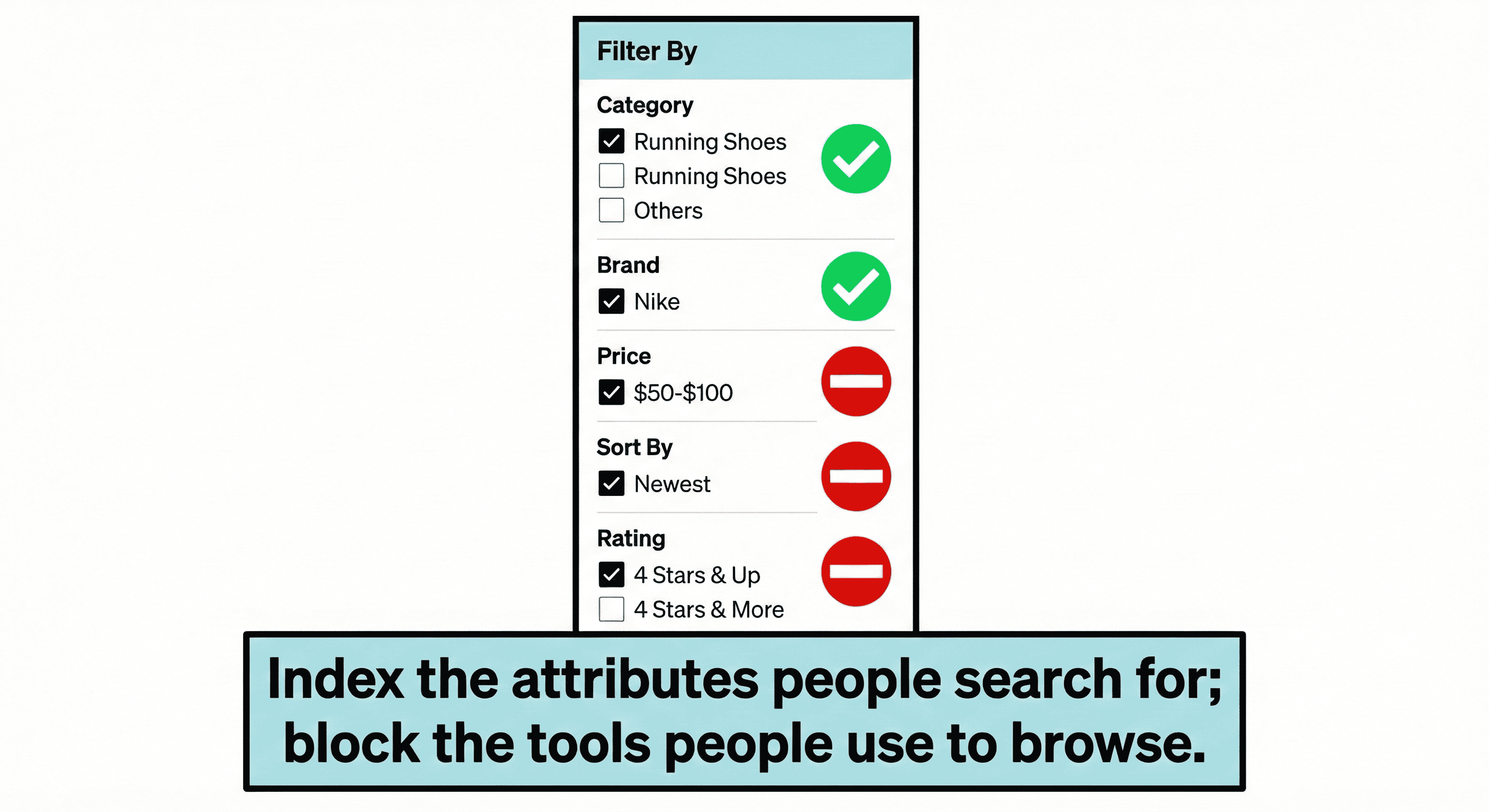
Separate “SEO facets” from “utility facets”
- SEO facets: a small set of filter combinations that match common searches and deserve indexable landing pages
Example: “men’s running shoes size 10” might be valuable, depending on your niche. - Utility facets: combinations that exist to help shoppers narrow down but don’t deserve indexation
Example: color=red&size=10&brand=nike&price=50-100&sort=popular
The mistake is letting utility facets become indexable by default.
How to handle utility facets
Choose one main method; don’t mix randomly.
Option 1: noindex,follow on utility facet pages
- Pros: crawlers can still pass through links to products
- Cons: Google may still crawl them often; you still need internal link discipline
Option 2: Canonical utility facets to the nearest clean page
Usually the base category.
- Pros: consolidates signals
- Cons: may get ignored if signals conflict
Option 3: Block crawling of specific parameter patterns
- Pros: reduces crawl waste
- Cons: if you block crawling, Google can’t see canonicals on those URLs, and signals may remain messy if those URLs receive links
In practice, many stores use a mix:
- Keep crawling open for product discovery
- Use noindex for index control
- Use canonical for consolidation
- Remove internal links that create infinite parameter paths
Fix 4: Clean your XML sitemaps (only list primary URLs)
Sitemaps are not ranking magic, but they are a strong “these matter” signal.
If your sitemap includes 10 URLs per product (variants, parameters), you are feeding index bloat.
Sitemap rule for product pages:
- Include only the primary product URL for each product family (Strategy A / Hybrid default).
- Include variant URLs only if they are deliberately indexable (Strategy B / selected Hybrid pages).
Fix 5: Merge structured data to match your primary URL
Search features depend on clean entity signals.
If each variant URL has Product schema that describes basically the same product, you create structured duplication too.
What to align
- Product schema url should match the canonical URL for that entity page.
- If you have variants, represent them in structured data without creating many competing entity pages.
Many stores model this as:
- One primary product entity page
- Variant offers as options tied to that product
If you do keep variant URLs indexable, treat them as separate products in schema terms, not clones.
Fix 6: Use 301 redirects only when the duplicate URL is truly disposable
Redirects are stronger than canonical hints, but they also change user experience and tracking.
Use a 301 when:
- You are removing an old URL format (example: /product/shoe-blue → /product/shoe)
- You have legacy parameter URLs that got indexed and you can safely collapse them
- You are confident the destination page fulfils the same intent
Avoid mass redirects when:
- Users rely on variant URLs for specific selections
- You have external partners linking to variant-specific pages with variant intent
- You’re not sure which URL should be primary yet
Fix 7: Make variant handling consistent across templates
Variant duplication often comes from mixed rules:
- PDP uses parent URL, but swatches create variant URLs
- Category links go to parent, but search results link to variants
- Canonical points to parent, but breadcrumbs point to variant
- Reviews are loaded differently per variant URL
Pick the primary URL, then make templates match it.
Consistency beats cleverness.
The hard part: when variant pages really should be separate
Some variants are not “just a colour.” They change meaning.
Separate indexable variant pages can work when each variant has:
- Distinct search demand
- A distinct primary keyword set
- Unique images and unique description blocks
- Variant-specific specs that people search for
- Variant-specific availability and pricing patterns
If you don’t have those, separate pages are usually ranking overhead.
A clean heuristic:
Keep a variant indexable when
- The variant keyword appears in Search Console queries with meaningful impressions, and
- The variant’s conversion behaviour is materially different, and
- You can write variant-specific content without padding
Otherwise, fold it into the parent.
A practical workflow: diagnose → decide → consolidate → validate
Step 1: Inventory your duplicate types
Create a list of all URL patterns that produce product duplicates:
- Variant path URLs (/product-blue)
- Variant parameters (?color=blue)
- Tracking parameters (?utm_)
- Sort parameters (?sort=)
- Facet parameters (?size=10&color=red)
- Alternate views (?view=)
- Print pages (?print=1)
Step 2: Choose the primary URL rule
Write it as a simple statement, for example:
- “One indexable URL per product family. Variant URLs exist for UX only and canonical to the parent.”
Step 3: Apply consolidation in this order
- Canonicals on all duplicates
- Internal links point only to primary URLs
- Sitemaps list only primary URLs
- Index control for facets (noindex/canonical/block rules)
- Redirect legacy URLs if safe
This order reduces mixed signals.
Example scenario: what recovery can look like
Imagine a store with:
- 2,000 products
- Average 6 variants each
- Facets create many parameter combinations
Before cleanup:
- 30,000+ indexed URLs (most are duplicates)
- Many products show 2–5 competing URLs in Search Console
- Crawl activity spent heavily on parameter URLs
After cleanup:
- 2,000–3,000 primary product URLs indexed
- Variant URLs either not indexed or treated as alternates
- Category pages crawl and index more consistently
- Product impressions consolidate onto primary URLs, lifting average position for core queries
The lift can come from consolidation alone: stronger pages, clearer signals, less noise.
What to monitor after changes
Search Console
- Indexing → Pages: watch duplicate-related reasons shrink over time
- Performance: look for fewer URLs driving impressions for the same product query set
- URL Inspection: confirm Google-selected canonical matches your primary URL
Crawl behavior
If you have server logs or a crawler:
- Googlebot hits fewer parameter URLs
- Primary product URLs get crawled more often
- Discovery of new products speeds up
Revenue tracking sanity check
When variant URLs stop ranking, you’ll often see:
- Cleaner attribution (fewer landing page variants)
- Higher conversion rate on consolidated landing pages (less mismatch)
Key takeaways
- Duplicate product pages are often created by variants and parameters, not bad intentions.
- The cost is signal dilution: links, relevance, crawl focus, and index quality split across many URLs.
- Recovery rarely needs a rebuild. It usually needs:
- One primary URL rule
- Canonicals that match that rule
- Internal links and sitemaps that reinforce the same rule
- Facet controls so utility URLs don’t flood the index
FAQ
Should I put noindex on variant pages?
If you want one URL per product family, noindex can work, but canonical + internal link control usually does more. noindex is a directive for indexation, not a consolidation tool for signals. Many stores combine noindex for utility pages with canonical for consolidation.
Should I block filter URLs in robots.txt?
Blocking can reduce crawl waste, but it can also prevent Google from seeing canonicals on those URLs. Use blocks only when you’re sure you don’t need those URLs crawled for discovery, and when internal links won’t keep creating crawl paths.
Is duplicate content a “penalty”?
Most of the time it behaves like a weighting problem, not a penalty. Rankings drop because signals are split and quality signals get noisy.
What about pagination on category pages?
Pagination is separate from product duplication, but it can compound crawl waste when mixed with facets and sorts. Keep paginated pages accessible for discovery, and avoid creating endless sort/filter combinations across paginated sets.
Related Post


Get in touch today
complete the form below for an informal chat about your business

We are a small, but perfectly formed, Digital Marketing Agency based in Stoke-on-Trent, Staffordshire. We provide services that help business owners make more money online.

